![SmartCircle_Logo_2020-1.png]](https://support.sensormedia.com/hs-fs/hubfs/SmartCircle_Logo_2020-1.png?width=40&height=40&name=SmartCircle_Logo_2020-1.png)
If you need to perform a factory reset and you have SmartCircle Display already installed use Method 1 or 2. Move to Method 3 if you are preparing for a setup.
This process will remove all accounts, previous settings, and data (including images, videos, etc.) stored on the device. If a particular method is failing try another one.
Method 1:
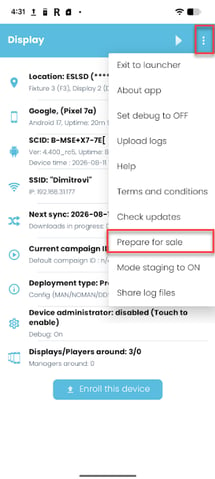
- Open Display 4 app and disarm it
- Tap on the 3 dots in the top right of the app
- Choose prepare for sale
This will unassign the device and factory reset it
Method 2:
- Open Display 4 app and disarm it
- Tap on the button - Enroll this device
- Type the enrollment code of the location
- Choose Unassign
- Choose yes when it prompts you to factory reset the device
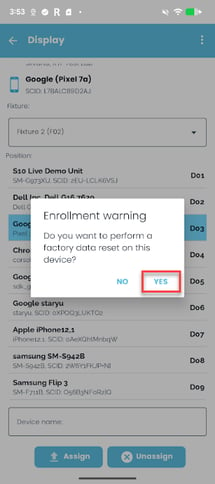
If the device is already running as part of a campaign, it will first be necessary to unregister the SmartCircle Display app.
Method 3:
- Swipe up to open the main menu.
- Go to Settings, then choose one of the following options:
- Tap on General Management > Factory Data Reset
- Search for "Factory reset" > Factory Data Reset
- Tap on Reset.
- If there is any information stored on the device or external apps installed, tap on Erase All.
Video:
This is NOT recommended, but if it is not possible to perform the factory reset, proceed with a Basic Installation.. Please note that the device may not work correctly and may require additional support in the long term.